From the desk of David Utke
Subj: So how good is a free (yes free) hosting plan?
One thing that drives me crazy watching other creators talk about the “best free hosting” is they always mention Wix or Google Sites.
Those are not web hosts, they’re website builders. Look, I love Google Sites but when we’re talking about free hosting we mean server side access or a JAMstack platform.
Not a trial account on Wix or a non-commercial website builder.
InfinityFree.com is one of the few truly free web hosting platforms
With this platform you can run a self-hosted WordPress site for free. Having built websites on the platform myself using both WordPress and their built-in site builder, I can tell you it’s not without its limitations.
Here’s is my breakdown as someone who actually used this platform to build websites with.
⚡Resources
Namecheap – You’re going to want a custom domain and Namecheap is my domain registrar of choice. Low prices and low renewal rates.
Hostinger – An excellent starter host that for commercial use that costs just a few dollars a month. Perfect when you’re ready to move away from Infinity Free. Use coupon code WEBPRO at checkout for an additional discount.
The Pros of InfinityFree.com
1. Genuinely free WordPress hosting with no strings attached
The headline feature of this host, you can run a fully functional WordPress website on InfinityFree without spending a single cent on hosting.
That means a custom domain name, a free SSL certificate, your own choice of themes and plugins, and a proper self-hosted WordPress installation.
What makes this stand out is that there really are no strings. A lot of “free” hosting services come with hidden catches in that they require a credit card on file, force you to log in monthly or your site gets suspended, or lure you in with a free trial that expires at some point.
InfinityFree has none of that. You sign up, you build your site, and it stays live.
2. Clean, bloat-free WordPress installation
If you’ve ever set up WordPress through a host like Bluehost or Hostinger, you’ll know have to immediately have to wade through a bunch of pre-installed plugins, random themes, and branded tools that you didn’t ask for.
InfinityFree doesn’t do this.
When you install WordPress via Softaculous (their script installer), you get a clean, vanilla WordPress setup. Nothing extra, nothing forced on you.
3. Staging site support
This is a feature you wouldn’t necessarily expect from a free host, and it’s a genuinely useful one. Because InfinityFree gives you access to Softaculous on the backend, you can create a staging version of your live WordPress site.
A staging site is a private copy of your website where you can safely test changes. New plugins, theme updates, layout tweaks, code edits, all without touching your live site.
If something breaks on staging, no problem: just delete it and start over. Once you’re happy with the changes, you can push them to your live site.
4. Access to cPanel, File Manager, and .htaccess
InfinityFree gives you real access to the underlying hosting infrastructure, including cPanel, a file manager, and direct access to your .htaccess file. This matters more than it might sound.
Need to verify site ownership with Google Search Console or Google AdSense? You’ll need file access to do that.
Want to set up redirects, block certain traffic, or tweak server behavior? That’s what .htaccess is for.
Want to directly edit a WordPress config file? File Manager has you covered.
Many free hosts lock you out of these tools entirely. InfinityFree doesn’t.
5. No forced ads on your website
One of the most common ways free web hosts make money is by displaying their own advertising on your website. You get free hosting; they get ad revenue from your visitors. It’s a trade-off that makes your site look unprofessional and undermines your brand.
InfinityFree does not run any sort of display ads or ads for Infinity Free on your website. You’re free to run your own ads like Google AdSense, affiliate banners, whatever you choose, or none at all.
The important thing is that it’s your decision, not theirs.
6. Instant account setup
There’s no waiting period, no account approval queue, and no support ticket to open before you can get started.
Sign up, verify your email, and you’re in.
Some free hosts make you wait days for account approval, InfinityFree gets you building immediately.
7. 5 GB of disk space and unlimited bandwidth
InfinityFree gives you 5 GB of storage and unlimited bandwidth on the free plan. That said, the bandwidth comes with an important caveat: there’s a hard limit of 50,000 hits per 24-hour period.
“Hits” aren’t the same as visitors. Every image, CSS file, JavaScript file, and page request on your site counts as a separate hit. So a single visitor loading one page might generate 20–30 hits depending on how your site is built.
In practical terms, this caps you at roughly 100–300 visitors per day for a typical WordPress site. For a new or low-traffic project, that’s workable. Just understand that “unlimited bandwidth” is a marketing term, the hit limit is the real ceiling.
The 5 GB of storage is more than enough for a standard WordPress blog or small business site, though it’ll fill up faster if you’re uploading a lot of high-resolution images or video files.
8. SSL certificates are free, in-dashboard, and renewable
InfinityFree supports free SSL certificates through Let’s Encrypt and Google Trust Services, and the entire process from issuing and renewing is handled directly inside the dashboard without needing any external tools or command-line workarounds.
For a free host, having SSL management built in like this is a genuine convenience as it’s way to technical and annoying otherwise.
One thing to note: if you’re using a free InfinityFree subdomain rather than a custom domain, SSL availability can be limited.
Let’s Encrypt caps the number of certificates it issues per registered domain, so InfinityFree can’t always provide SSL for every customer subdomain under its name.
This is another reason to connect a custom domain rather than relying on the free subdomain.
9. Cloudflare integration
InfinityFree integrates with Cloudflare, which is a meaningful bonus. Cloudflare acts as a proxy between your visitors and your server, providing basic DDoS protection, caching, and speed improvements, particularly for visitors who are geographically far from InfinityFree’s servers.
It won’t turn InfinityFree into a fast host, but it does take the edge off some of the performance limitations and adds a layer of security you wouldn’t otherwise get on a free plan.
The Cons of InfinityFree.com
1. The WordPress setup process is multi-step
Getting a WordPress site fully live on InfinityFree isn’t difficult exactly, but it involves more steps than most beginner-friendly hosts like Bluehost.
It involves a bit of patience and waiting. Here’s roughly what the process looks like:
- Create your InfinityFree account
- Add your custom domain name and configure the nameservers
- Wait 6–10 hours for DNS propagation
- Issue a free SSL certificate for your domain
- Wait 1–2 more hours for the certificate to activate
- Install WordPress via Softaculous
Done!
That last step comes with a confusing quirk: even after your SSL certificate has been issued, Softaculous will display a warning saying the SSL certificate isn’t detected.
This is misleading as everything is fine and working correctly. You just need to know to ignore the warning, make sure you’ve selected HTTPS and the correct domain (not the subdomain), and proceed with the installation. If you don’t know that going in, it looks like something’s wrong when it isn’t.
For someone who’s comfortable with DNS, cPanel, and server-side concepts, this is no big deal. For a complete beginner, it’s a learning curve.
2. No custom email addresses
InfinityFree doesn’t support custom email hosting, which means you can’t create a professional branded email address like hello@example.com through your hosting account.
If a professional email address is important for what you’re doing you’ll need to set that up separately through a service like Google Workspace or Zoho Mail.
3. Support is limited to forums and community resources
There’s no live chat, no ticket system, and no email support. If you run into a problem, you’re relying on community forums and third-party tutorials like mine.
For a free service, that’s understandable but it’s worth setting your expectations accordingly. If something goes wrong then it’s on you to figure it out.
That said, the WordPress community is enormous, and most issues you’ll encounter with InfinityFree have been documented somewhere.
It just requires more self-sufficiency than a paid host would.
4. Strict resource limits — this is a low-traffic platform
The 100–300 daily visitor figure is, realistically, a hard ceiling (and 300 is the optimistic end). That assumes a lightweight, well-optimized site. The technical mechanism behind this is a 50,000 hits-per-24-hours limit (explained in the pros section above).
A more realistic expectation for a typical WordPress site is somewhere in the 100–200 visitors per day range before you start hitting CPU or memory limits.
When you hit those limits, your site can slow down significantly or even become temporarily unavailable. InfinityFree is genuinely well-suited for what it is, a low-traffic hosting platform. But it’s not suitable for a site you’re actively trying to grow.
If your goal is to eventually drive real traffic then don’t waste your time on this free host, sign up to Bluehost or Hostinger instead.
5. Account suspensions can happen without warning
This is one of the most commonly reported issues among InfinityFree users, and it’s worth knowing about upfront. Accounts can be suspended unexpectedly, sometimes for legitimate reasons like exceeding resource limits, but sometimes with no clear explanation.
Some users have reported their sites being incorrectly flagged as harmful and suspended without notice.
The takeaway is you don’t want to host anything on InfinityFree that you can’t afford to have go offline without warning.
Treat InfinityFree as a platform for projects where temporary downtime is an inconvenience rather than a crisis.
For anything business-critical, a paid host with a proper uptime guarantee is a much safer bet.
Hostinger
Recommended by WordPress, they are the best starter host and have the most competitive pricing for quality hosting around.
Great hosting & support, free domain name, free WHOIS protection and competitive pricing. I use them in all my tutorials.
Use coupon code WEBPRO at checkout for an added discount!

6. Slow load speeds
Free hosting means shared server resources, and that shows in performance. When I tested a website I built on InfinityFree using Pingdom, it came back with an 8-second load time from a US-based server.
To put that in context, for best practice is 1–3 seconds, with under 1 second being ideal. 8 seconds is well outside what Google considers acceptable for a good user experience, and slow load times have a direct negative impact on both SEO rankings and visitor retention.
A more minimal site with fewer images and lighter plugins will load faster. But even optimized sites on InfinityFree will struggle to compete with paid hosting on speed.
7. The hosting dashboard is full of ads
While InfinityFree won’t place ads on your website, the hosting control panel itself is heavily monetized with display advertising.
It’s not a dealbreaker, but it does make the dashboard feel cluttered and less professional than what you’d get with a paid host.
8. The built-in website builder isn’t really usable
InfinityFree’s homepage prominently promotes a website builder (powered by SitePro) as an alternative to WordPress.
The catch is that when you publish your site through the builder, a large SitePro promotional banner is displayed at the top of your website, similar to how the free tier of Wix works.
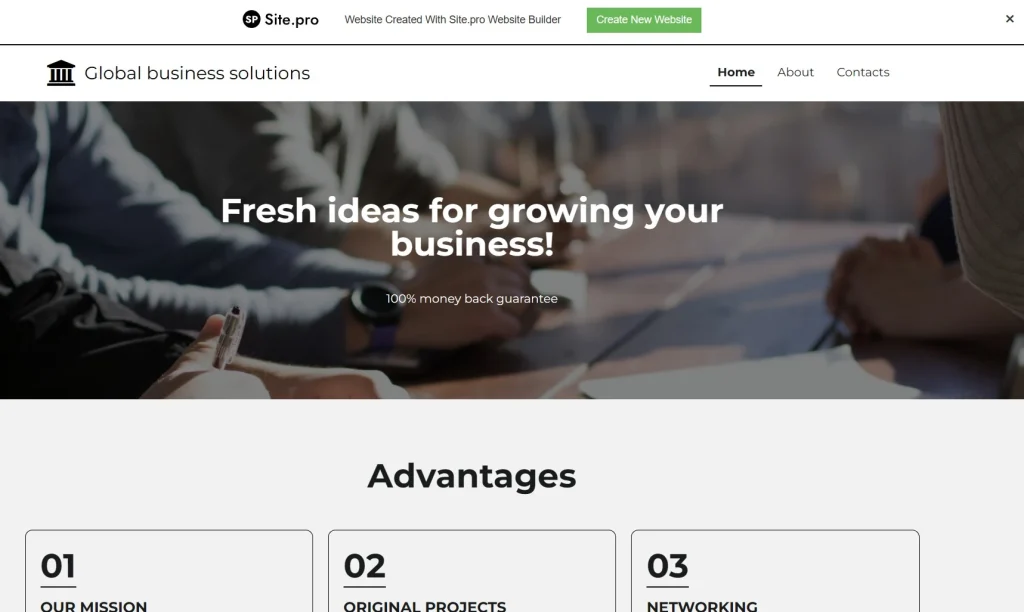
To remove that banner, you’d need to upgrade to a paid SitePro plan, and importantly, that’s a separate payment from your hosting account.
So the “free website builder” is really more of a demo. Stick with WordPress instead if you’re looking to take full advantage of InfinityFree.
Site.Pro is not bad, they are a decent low cost website builder. But the whole point of using a free host is to host a website for free.
So Who Is InfinityFree Best For?
InfinityFree is a legitimate, genuinely free hosting option that works best for specific use cases. Here’s where I think it makes the most sense:
- Sales pages and landing pages: If you use a digital product platform like ThriveCart or Samcart and want a dedicated, branded WordPress sales page, InfinityFree is a solid free option to host it.
- Practice and learning: It’s a great environment to get hands-on experience with WordPress, cPanel, DNS, and SSL without spending money.
- Hobby projects and personal sites: Low-traffic websites, personal portfolios, or a casual blog with modest audience.
- Temporary or experimental sites: Need to spin up a WordPress site quickly to test something? InfinityFree gives you that flexibility for free.
Executive Summary
InfinityFree does exactly what it promises: it gives you a real, functional, ad-free WordPress hosting environment completely for free.
For a low-traffic site, a side project, or a dedicated landing page, it’s hard to beat on value. Just go in with realistic expectations around speed, traffic limits, and the technical setup process. and you’ll get a lot out of it.
⚡Resources
Namecheap – You’re going to want a custom domain and Namecheap is my domain registrar of choice. Low prices and low renewal rates.
Hostinger – An excellent starter host that for commercial use that costs just a few dollars a month. Perfect when you’re ready to move away from Infinity Free. Use coupon code WEBPRO at checkout for an additional discount.
How I can help you. You're here, let's do this:
1. Website Review Your website may be clear and specific to you, but it may be really confusing to anyone who visits. That's where I come it, I'll give you actionalbe feedback to improve your site with my highly rated gig.2. My YouTube channel Helpful video tutorials showing you how to launch, grow and monetize your audience.