Email marketing is still one of the most powerful tools for turning any website into an online business. So what are the best email marketing software service providers? The answer depends on your budget, marketing needs and overall goals.
From sending out a simple weekly or monthly newsletter to your followers, to building out advanced full featured user journeys to convert subscribers into buyers, in this detailed software review I’m going to break down your best options for different and specific use cases.
Essential email marketing features to look for:
1. Deliverability of your emails
You want your emails hitting the inbox, not the spam folder or the promotions tab in Gmail. Deliverability of your emails comes down to a few things. Images, what words you use in your copy (“make money online” is a sure fire way to land in the promotions tab or spam folder!) and your overall domain reputation.
2. Email autoresponder
An autoresponder, often called a “workflow” on many platforms is simply automated emails someone gets when they sign up to your list or trigger an action.
3. Email marketing funnel
With email marketing you can create an email funnel for your list. A funnel is a series of emails someone gets with the end goal to convert them to buy. More advanced software provides detailed funnel construction, if/or functions and user behavior.
4. List separation
List separation means you can create different funnels for different types of content. Maybe you have subscribers signing up on a video where you talk about how to start a YouTube channel and another video where you talk about personal finance for solo creators.
5. Affiliate Marketing Friendly
Affiliate marketing is promoting products and services for a commission. It’s one of the most effective ways to monetize your email list yet a few email service providers frown on affiliate marketing. Instead, some providers want you to only promote your website, videos and offers where the email is providing value.
Convert Kit – Best for content marketers (bloggers, Youtubers etc)
Convert Kit was made for bloggers and YouTubers who engage in affiliate marketing and who also sell their own digital products like courses and ebooks. They are my top choice for both YouTubers and bloggers because they have the right mix of deliverability and features content marketers need.
Specifically, Convert Kit is designed for you to create a product funnel. They have a unique built in tagging system so you can separate your list into various segments and behaviors. Those who bought, those who did not, those who opened the email those who did not.
Sales funnels
You can also create different funnels with one account with ease. For example, I could set up a free “how to start a blog” email course and put opt-in forms on relevant pages here. I could also create an “affiliate marketing for beginners” course and put different opt-in forms on different pages and posts.
Those are two similar audiences so broadly speaking, they would both be interested in my content but I could create a higher value offer for both groups. It’s this funnel centric nature that makes Convert Kit so popular.
Products
Kit allows you to create simple sales pages and your host digital products on their platform like checklist, cheat sheets, ebooks and so forth. So if you’re looking for a simple way to have both an email list and sell low ticket items Kit is not a bad choice for that.
Newsletter
Finally, Kit is an excellent choice if you want to start a simple weekly email newsletter website. With high converting templates and solid deliverability, Kit makes it incredibly easy to send out a quality newsletter.
Their “newsletter” tier allows for 10,000 subscribers for free. No limits on email sends. Sure, you don’t get automations but if you want to grow a newsletter to 10k subscribers then Kit allows you to do so completely for free.
Pros and Cons
Pros:
- Designed for bloggers and YouTubers who have their own products to sell and want to make next level money.
- Helpful tagging system to allow you to create automatic sales funnels that convert.
- Affiliate marketing friendly and very easy to implement and use on a YouTube channel.
- Comes with high converting landing pages if you don’t yet have a website.
- Great if you want to launch a weekly newsletter as well.
Cons:
- List centric, it’s not ideal for multiple websites. If you have two wildly different audiences you’ll need two Convert Kit accounts.
- Expensive for small lists, their price points are reasonable once you have a few thousand subscribers.
- Not ideal for seasonal audiences. If want to send the same content at the same time every year automatically you can’t do that with Convert Kit.
Active Campaign – The powerful professional choice
If email marketing is the life blood of your business, if it’s what’s driving your sales more than anything else then you need to seriously look at moving over to Active Campaign (sorry don’t mean to be too hyperbolic, but that’s why you’re here because you trust me).
Active Campaign email marketing software is a very robust solution for professional content marketers and small businesses. The system features many different templates and optimization tools that allow you to segment and track your audiences behavior easily.
You can send highly personalized emails based on customer preferences and behavior as well as manage all phases of the user experience from the welcome email to the funnel process. Active Campaign also lets you send emails that based on local time, SMS messages as well the ability to cycle subscribers through the same email series.
True “Pro-Level” Features
This is the email marketing tool for those who want to create a self-running revenue engine that connects their website, email, and sales pipeline.
Behavioral Site Tracking
This is its “secret sauce.” You can trigger an email based on exactly what a subscriber does on your WordPress site.
Predictive Sending (AI)
It doesn’t just send at a “scheduled time.” It analyzes when each individual person on your list typically opens their mail and holds the message until that exact window.
The CRM Integration
It has a built-in sales pipeline. You can move “Deals” through stages (e.g., Lead → Review Sent → Follow-up → Closed) and have the email marketing adapt automatically based on the deal stage.
Split Automations
Most tools let you A/B test a subject line. ActiveCampaign lets you A/B test an entire workflow. You can send 50% of your leads down “Path A” and 50% down “Path B” to see which sequence generates more revenue.
Pros and Cons
Pros:
- Can have multiple lists for different YouTube channels and websites with one account.
- Can loop subscribers through your email sequence. Essential if you have a seasonal topic.
- Excellent deliverability and advanced backend analytics.
- Superior automations based on user behavior. Create complex, advanced funnels.
- Extreme customizations through their visual automations builder.
Cons:
- Active Campaign is powerful and expensive.
- It’s advanced and has a lot of pro level features most YouTubers won’t use.
- Steep Learning Curve: Because it does so much, it can be overwhelming for a total beginner. You will likely need to spend a week in “ActiveCampaign University” (their training portal) to full understand what their platform is capable of.
Sender – Best free plan with automations
A free plan with automations? Yep. Sender is now the free plan king if you’re looking for email marketing and not just a weekly newsletter.
Incredibly generous free plan
Their free plan allows you to store up to 2,500 subscribers and send 15,000 emails per month. This is roughly five times the capacity of Mailer Lite’s free plan (they used to be the best free plan), giving a new business much more “runway” to grow before needing to pay for a subscription.
Unlike many other “budget” tools that lock their best features behind a paywall, Sender includes unlimited automation workflows, 24/7 live support, and access to their full library of 1,600+ responsive templates on the free plan.
Pro features for free?!
You can easily set up automated Welcome Sequences, Abandoned Cart reminders, and Re-engagement flows using a visual builder. It also acts as a basic CRM, allowing you to segment your audience based on their behavior (like what links they click) or custom tags.
It even includes transactional email capabilities (API/SMTP), meaning you can use it to send system-critical messages like order receipts and password resets alongside your marketing newsletters.
Pros and Cons
Pros:
- The best free-to-paid value ratio. 24/7 human support for all users; high deliverability infrastructure; includes SMS and push notification options.
Cons:
- The free plan also includes a “Sent with Sender” logo in the footer. A fair compromise given everything else.
Brevo – Low frequency, high volume
Most platforms, as your list grows, your monthly bill goes up, even if you don’t email them. Brevo flips this on it’s head. You pay a low cost subscription fee and get an allowance of emails to send out each month.
100,000 emails for only $60 a month – What?!
That’s right, you can store up to 100,000 on the “starter” plan and pay only $60 or so to email your entire list. Brevo is the best choice for the ‘Low-Frequency, High-Volume’ email marketer.
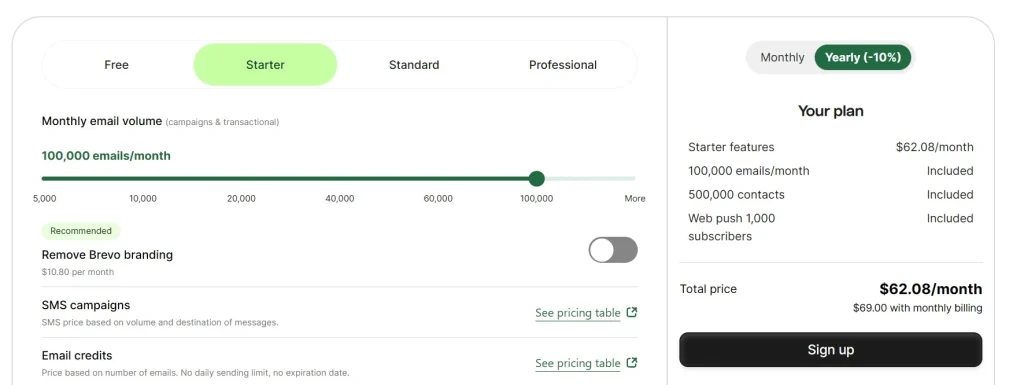
If you have a huge list but you only send a monthly update or a few big launch sequences a year, why pay a subscription every month? Use Brevo to store a massive list that you intend on contacting once or twice a month.
Starter vs standard plan
Go with STARTER if:
- You are just starting out and don’t care about a “Sent with Brevo” logo in the footer.
- You only need to send simple, manual newsletters once a week, once a month etc.
- You don’t need complicated automations
Go with STANDARD if:
- You want a professional brand. (Cheapest way to remove the logo).
- You want to use the “Behavioral Tracking” we talked about (sending emails based on what they click on your site).
- You want to A/B test your subject lines to increase your revenue-per-email.
- You need a Landing Page to collect emails before your main site is ready.
The Starter plan is for those who just want to email a big list periodically.
The Standard plan is for those who want more traditional email marketing features with Brevo workflows (their terminology for automations) along with AI send time optimizations.
Pros and Cons
Pros:
- Can build a massive contact list, even on the free plan. Yes, you can only send out 300 emails a month but if you want you can build a list of 100K+ if you like.
- Brevo is incredibly cost effective if you’re looking to send out a periodic email. $60 to email 100K contacts is ridiculous and would cost you $1000+ a month or more on other platforms.
- They also have traditional email marketing automations and built in AI send time optimizations.
Cons:
- While the starter plan is very cost effective, you do need to upgrade to the standard plan to remove all Brevo branding.
Beehiiv – The newsletter platform
I have a very popular Beehiiv tutorial you can checkout. I’ve used Beehiiv extensively and it’s a powerful email newsletter platform focused on growth and monetization.
The platform’s core strength lies in its native growth loops, specifically the recommendation network and Boosts. When a new reader joins your list, Beehiiv can immediately show them a “Top 4” list of other newsletters you recommend, and those creators can return the favor, often leading to a viral growth effect that is hard to replicate on traditional ESPs.
Boosting with Beehiiv
For those with a budget, the Boosts marketplace allows you to pay for new, verified subscribers on a CPA (cost-per-acquisition) basis, or conversely, earn money by recommending other newsletters to your own growing audience.
Built in ad network
Monetization on Beehiiv is aggressive and built-in, featuring a native Ad Network that connects you with sponsors once you reach a certain scale. Unlike Substack, which takes a 10% cut of your earnings, beehiiv maintains a 0% platform fee on paid subscriptions, meaning you keep all your revenue aside from standard Stripe processing fees.
While you can run your own sponsorships like Justin Welsh does, it’s a bit time consuming and manual. Having to go back and forth with potential advertisers, negotiate a price point, have a timeline of when what ad is going to be published when.
With Beehiiv, it’s a simple, easy to use network that’s built in. You get a notification that a company want’s to run a display ad in your email and you simply approve or deny it.
Pros and Cons
Pros:
- Strong monetization options and growth tools built in.
- Excellent deliverability.
- Can customize your Beehiiv website.
- Basic (but useful) automations. Create a re-engagement campaign, onboarding series or setup a done for you 6 month email sequence.
Cons:
- The automations are basic and nowhere near as advanced as say a Kit or Active Campaign.
- Cooke cutter website design. Like Substack, all Beehiiv sites have a distinct look to them.
Klaviyo – The “Industry Standard” for e-commerce.
Klaviyo is the gold standard if you’re running a profitable e-commerce website. It is incredibly powerful, but also complex and expensive. For a beginner, Klaviyo is like being handed the keys to a Ferrari when you’ve only just learned to drive; it’s fast and impressive, but it’s very easy to feel overwhelmed.
The “Shopify Specialist”
Klaviyo’s biggest claim to fame is its “creepy good” integration with Shopify. It doesn’t just see your customers; it tracks every move they make. It knows exactly when a customer looks at a specific blue shirt, adds it to their cart, and then leaves.
Because of this, its “Abandoned Cart” and “Browse Abandonment” flows are the most effective in the business, often paying for the software’s high cost through recovered sales alone.
Advanced Intelligence & Data
Klaviyo (like most companies) has leaned heavily into AI and Predictive Analytics. It can actually predict a customer’s “Next Purchase Date” or their “Churn Risk” (the likelihood they’ll never buy again) based on years of data patterns.
It also combines Email and SMS into one single timeline, so you can see exactly how a customer interacts with your brand across every channel without having to jump between different apps.
Pros & Cons
Pros:
- It offers the deepest data tracking available and the most robust library of pre-built “Flows” (automations) that are proven to generate revenue. If you are on Shopify, the setup takes literally two minutes.
- Free plan to get started, thought he pricing scales quickly once you outgrow the free plan.
Cons:
- The pricing is aggressive. It charges based on “Active Profiles,” and your bill can jump from $20 to $150+ very quickly as your list grows. Additionally, the interface is dense with technical jargon and data points that can be exhausting to learn for a first-time email marketer.
Flodesk – The “Aesthetics First” option
While tools like Klaviyo focus on data and Brevo focuses on cost-efficiency, Flodesk is built for creators where the look of the email is the most important part of the brand.
It is the best choice for designers, photographers, or lifestyle influencers who want their emails to look like high-end digital magazines without touching a single line of CSS.
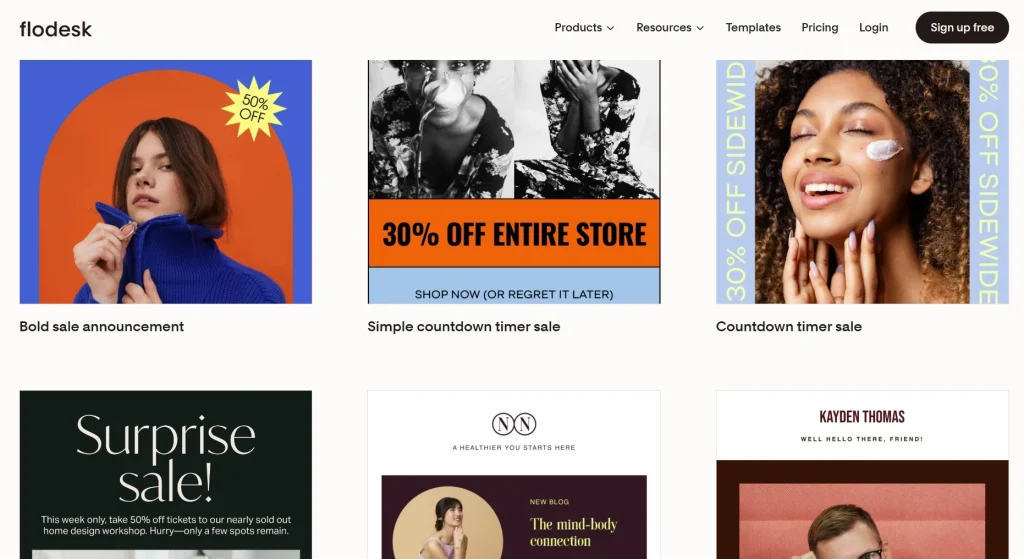
Flodesk’s main differentiator is its proprietary layout engine. Unlike standard editors that can be clunky, Flodesk allows you to overlap images, use custom fonts that actually show up in the inbox, and create pixel-perfect spacing.
It is essentially “Canva for Email,” making it almost impossible to send a basic looking email.
Workflows that work
For a beginner, the power of Flodesk workflows lies in “Link Actions” and “Behavioral Conditions.” You can set up a system where, if a subscriber clicks a specific link in your email (like a “Video Review” link), Flodesk automatically tags them or moves them into a new “Hot Lead” workflow without you lifting a finger.
It also handles the “logic of time” exceptionally well, letting you schedule delays down to the specific minute, day of the week, or even a specific time of day, ensuring your “Welcome Sequence” always hits their inbox exactly when they are most likely to be active.
Basic but useful ecommerce features
Flodesk does have a native Abandoned Cart and Post-Purchase workflows. If you connect your shop (Shopify, WooCommerce, or even Flodesk’s own “Checkouts”), you can trigger automated nudges the moment someone leaves an item in their cart or send a specific guide or upsell immediately after they buy.
Pros and cons
Pros:
- You can design and schedule a professional-grade email in 20 minutes.
- Simply beautiful emails that can match your brand.
Cons:
- Flodesk lacks advanced features. This platform still offers basic automation logic, limited A/B testing, and fewer third-party integrations than competitors like Kit or MailerLite.
Executive Summary for the BEST Email Marketing tools/software:
TLDR? Well here is my executive summary of the best email marketing software options (for specific use cases too)
- Convert Kit – Perfect for solo creators and small teams looking to sell digital products of their own or as an affiliate.
- Active Campaign – Full featured email marketing provider that really has no limits.
- Sender – A very generous free plan to help you begin email marketing.
- Brevo -The cost effective choice. Excellent for sending out a monthly newsletter.
- Beehiiv – A newsletter platform focused on growth and monetization.
- Klayvio – The gold standard for ecommerce sites, particularly Shopify.
- FloDesk – Beautiful emails, the digital magazine option.
Any questions? Drop me an email. Till next time.
Your man,
-David
How I can help you. You're here, let's do this:
1. Website Review Your website may be clear and specific to you, but it may be really confusing to anyone who visits. That's where I come it, I'll give you actionalbe feedback to improve your site with my highly rated gig.2. My YouTube channel Helpful video tutorials showing you how to launch, grow and monetize your audience.