So you want to make millions of dollars selling online courses and digital products?
You’re going to need an online course platform for that. The advantage of a course/digital product platform is they take care of the product deliverable, as well as the sales and checkout pages.
On top of that, many of these online course website builder platforms allow you to provide additional services and features like 1 on 1 or group coaching, bump offers, referral discounts and upsells.
My top recommendation is now Thinkific if you’re primarily looking to sell online courses and digital downloads:
Online course platform features to look for
Easy product/content management
Provide a high quality content management system where you can upload videos, text, downloadable PDF documents and organize everything in an easy to use way.
Bundles, order bumps and upsells
Bundle your courses together at a higher ticket price, leverage order bumps on the checkout page and setup an upsell to increase customer LTV.
Landing pages that convert sales
Does the platform you’re looking at provide quality customizable sales pages for your courses, big buy buttons, sales video and a clean and easy checkout process to help drive sales.
Quality checkout page and easy process
The checkout is quite important. You want a quick and easy checkout process with a page that looks great, is trustworthy, can easily incorporate upsells on and is easy to navigate to various payment options.
Marketing features
Incorporate marketing features like course upsells, bump offers, coupon codes, email marketing integration, running your own affiliate marketing offer, webinars and hosting your own online community.
Best Online Course Platforms:
| Platform | Best For… | Pricing Model | Key Advantage |
|---|---|---|---|
| Thinkific | Professional Branding | $36/Monthly (Free Trial) | 0% transaction fees & polished “Academy” feel. |
| ThriveCart Learn | Maximum Profit / ROI | One-Time Lifetime Fee | Powerful sales funnels without the monthly “SaaS tax.” |
| Kajabi | All-in-One Business | Premium Monthly | Replaces your email, funnels, and hosting in one tool. |
| Skool | Community & Courses | Flat $99/mo | Gamification and social interaction built-in. |
| LearnDash | WordPress Power Users | Annual License | Total ownership and control of your data on your site. |
| Gumroad | Free to use | $0/mo (10% Fee) | Fastest setup with built-in global tax handling. |
Thinkific – The Best Overall Online Course Platform
If you’re looking for a way to sell online courses, then Thinkific is simply one of the best options because they allow unlimited courses on all there plans.

Once you upgrade to their “start” plan you can then begin bundling all your courses together for a higher price point. You could even just build out your whole website and make it once price point for all your courses.
With Thinkific you’re able to build sales pages, checkout pages, order bumps and leverage the course LMS on the backend to deliver the material.
How does Thinkific work?
You signup and then get a website that’s a subdomain of Thinkific (website.thinkific.com). You can set either a custom domain or (example.com) or use a sub-domain (learn.example.com).
This is a personal call based on your priorities, marketing and setup. Personally, I like using a dedicated domain.
All courses are directories on your website. Like example.com/course/course-title. The homepage can be designed either as a visual menu for all your different courses or as a sales page for a bundle offer.
You can of course create your own sales page in whatever platform you’re using and just link to your Thinkific checkout page, but Thinkific has a good website builder that allows you to make a modern, attractive website.
Easy student access
Because you’re building out a full on website, it’s very easy for your students to login and access the material they bought. This keeps customer support to a minimum and anyone who buys from you happy.
Website Builder and checkout pages
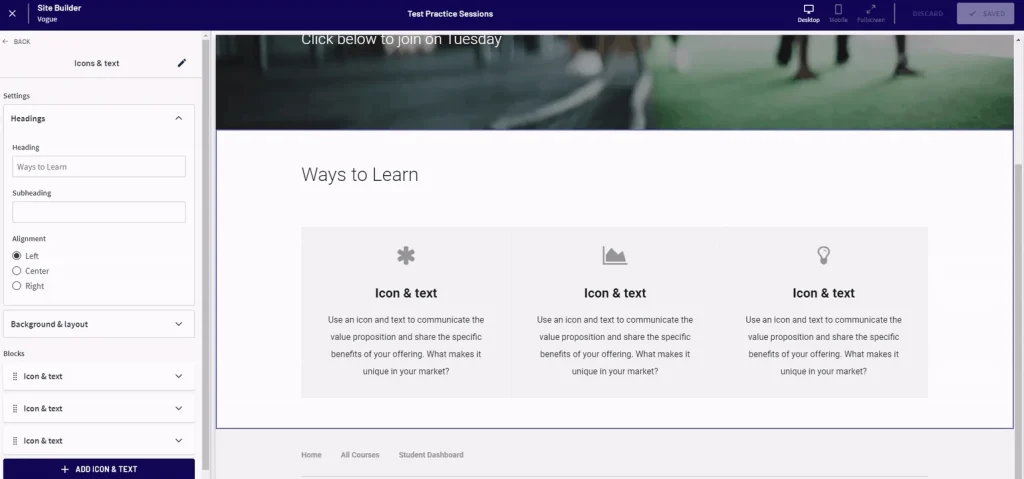
A drag-and-drop editor that lets you build a full website around your courses, not just a landing page. You easily add in different blocks to edit and adjust your website’s design.
The checkout pages are also clean and convert well with the ability to include order bumps in the sidebar as well as a product upsell once someone makes a purchase.
Affiliates
Thinkific requires you to manually pay out affiliates one by one. You’ll also need to keep track of payouts manually for tax purposes.
Running an affiliate program overall with Thinkific is find if you have a few high performing affiliates, but it’s not Thinkific’s strong suite if you’re looking to run a large affiliate program.
Lecture discussions
This is where Thinkific stands out, the platform is built on student interactions.
While like Teachable students can comment on lessons, Thinkific takes it to another level by allowing group discussions, community posts to cover different topics and you can also offer live lectures using Zoom within your course.
Thinkific uses a “Spaces” hierarchy within its communities. This allows you to organize your students in a way Teachable cannot:
- Topic-Specific Spaces: You can create separate areas for “Introductions,” “Homework Help,” or “Advanced Mastermind” topics.
- Course-Linked Spaces: You can automatically give students access to a specific community space as soon as they enroll in a specific course.
- The Difference: In Teachable, comments are mostly tied to specific lessons. In Thinkific, the community is a “living” destination where students return even after finishing the videos.
Pros and cons
Pros:
- Unlimited courses on all there plans with 5 digital downloads. No annoying product limits like Teachable.
- No transaction fees on any of their plans (Teachable for example charges 7.5% on their entry level plan for example).
- Sales pages that look great and incorporate your sales video in an effective way above the fold.
- You can offer live lessons for your students.
- Can sell your course as a group package.
Cons:
- No course bundles on their “basic” plan, you’ll need to upgrade your account for that feature.
- Your site will have modest Thinkific branding until you’re on their “grow” plan.
- Thinkific uses a “sticky” header, so your sales pages will have a global header. I prefer my sales pages to have no menu item.
➪ Why I switched to Thinkific from Teachable.
Thrive Cart Learn – The One time fee option
With your Thrive Cart account you can host digital downloads (ebooks, checklists, downloadable content) and use their “learn” feature to structure video courses that look great:

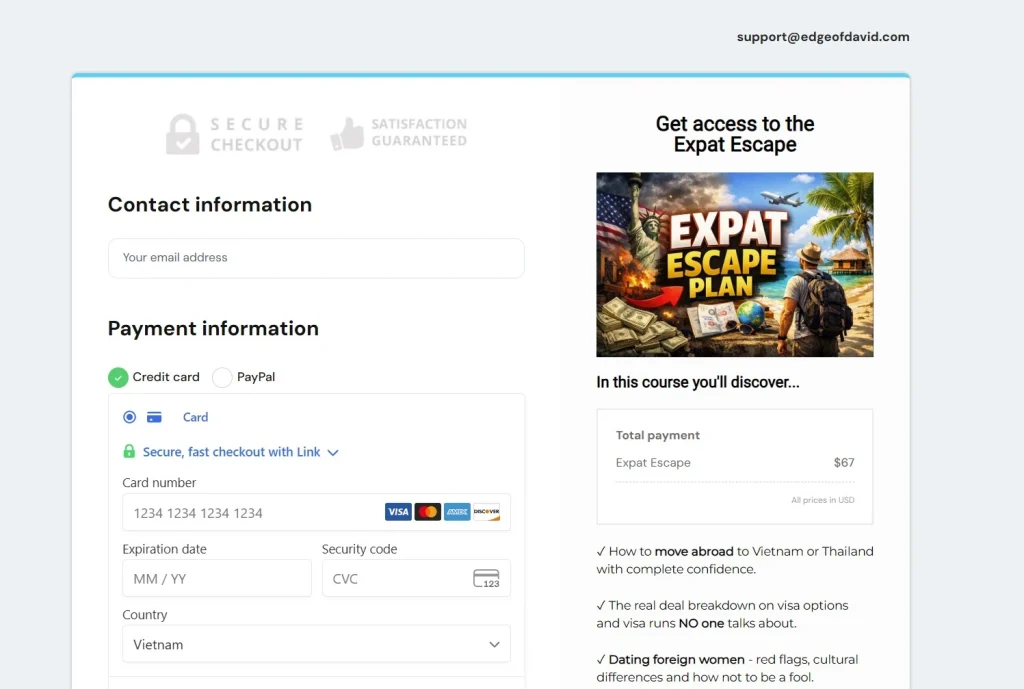
*My Expat Escape course is powered by Thrive Cart.
Learn is an extremely powerful and flexible course platform that is available for free directly within ThriveCart for ThriveCart users. –source
I love Thrive Cart for selling low cost digital products like ebooks, checklists, guides, courses and other downloads.
When you purchase Thrive Cart, you get an outstanding and customizable checkout page that leverages bump offers, downsells and one-click upsells.
So what’s the catch? No video hosting
Thrive Cart is not a video host. When you buy Thrive Cart you’re getting access to landing pages, thank you pages, checkout pages and the ability to integrate payment options, customize your courses and LMS, analytics and other 3rd party service integrations and so forth.
If you want to offer a video course, you’ll need to use either YouTube to embed unlisted videos or use a video host.
I personally use and recommend Bunny.net as a cheap, cost effective video host that provides security and content locking for your video course.
Affiliate program
With your Thrive Cart account you also get access to a feature rich affiliate program you can run for your online courses and products. The only difficulty is that you need to manually pay out your affiliates who make sales.
Unlike Teachable that has a “back office” feature where they take care of all affiliate payments and tax reporting, with Thrive Cart it is a bit more manual. However, Thrive Cart is a one time fee and having the ability to manage and run your own affiliate program is a huge plus.
Just make sure your affiliate use the right link so they are credited with the sales correctly. Otherwise, your affiliate get access to a clean dashboard and accurate reporting as well as reliable tracking of all sales they generate.
Pros:
- One time fee. By far, the cheapest most cost effective way to sell video courses.
- Unlimited courses with their Learn LMS.
- Course content is well structured.
- Create bump offers and upsells.
- Run your own affiliate program.
- Customizable checkout pages that convert
Cons:
- You’ll need to pay for video hosting for your courses.
- No comments or community function built it.
- Learning curve, a bit techy to setup.
Kajabi – The all in one marketing solution
Kajabi is an all in one platform. That means your blog, newsletter, sales funnels, courses, digital downloads and membership functionality are all built into your subscription payment.
With Kajabi, you can create beautiful course content, set up automatic course enrollment, and track learner progress. Plus, Kajabi integrates with many popular learning tools and platforms, so you can easily add supplemental materials to your courses.
In addition, you also can leverage their “Pipeline” feature which allows you to visually build automated funnels that connect landing pages, email sequences, forms, checkouts, and follow-ups
These come with pre-written copy that is designed to convert leads into sales. While you should build and test your own funnel pipeline, it’s a great base template to build off of.
Also, you can also customize your checkout and take advantage of blogging functionality for organic search traffic.
Not just for courses
When I see criticisms that Kajabi is expensive, I roll my eyes. It’s not just a course website. You can create a website, setup a blog for organic search traffic, host courses, podcast, run a membership, create a community and you get email marketing built in to help drive sales.
Instead of using WordPress for your blog, Convert Kit for you email marketing, Teachable for your courses you can instead built everything on one platform which is the unique selling point of Kajabi.
Although it’s a little pricier than some of the other platforms out there, it’s quite cost effective if you intend on using everything Kajabi offers which makes this one of the best marketing platforms around thanks to its wide range of built-in tools and features.
Pros:
- A true, all in one solution for gaining organic search traffic and converting that traffic through email marketing and paid products.
- Kajabi has an “academy” and an active forum to help learn how to best use all the features and tools available with this platform.
- If you don’t yet have a website, email marketing provide or an LMS solution for your courses, Kajabi is an effective choice.
Cons:
- If you already have a high traffic website and an email list then you won’t find the features of Kajabi that helpful.
- It’s a very expensive option if all you’re looking to do is to create and sell online courses.
- Affiliates are only included on the “Growth” plan.
Skool – Community and courses simplified
Skool was founded by Sam Ovens as a way to create a simple, easy to use platform for people who first and foremost want to build a niche specific community around a topic.
The pricing is straight forward:
- Hobby – $9/month with a 10% transaction fee.
- Pro – $99/month.
Use the Hobby plan to launch a Skool community (either free or paid) and upgrade when it makes sense based on the transaction fee.
With Skool you can have a free community with both private courses members can purchase or free courses, or a paid Skool community with courses.
An example of a Skool community (Nomad School):

With your subscription to Skool you can create a community, have a classroom where you can host your own courses, a calendar for upcoming events and a leaderboard where you can gamify achievements to have your community members move up in level.
Content lock course material
One useful marketing strategy built into Skool is the ability to content lock course material behind a specific number of months subscribed or a specific level reached through their gamification features.
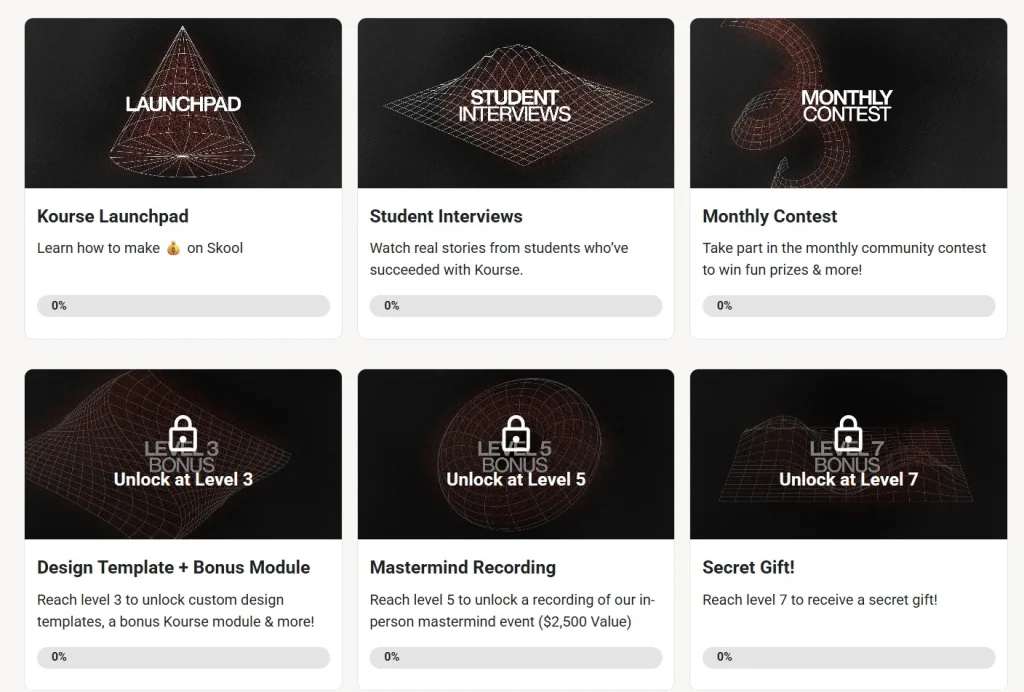
So if you’re charging a monthly fee, users have to stay subscriber for a period of time that you set (course unlocks after 3 months or 3 months, whatever you want) or you can set it through certain engagement requirements which keep your Skool more useful for all.
This all helps to keeps your churn rate down and members subscribed for longer.
Automatic email marketing
Posts in your Skool community are sent out to members periodically to members email. This is one reason why creators make a free community because everyone gets email updates who joins:
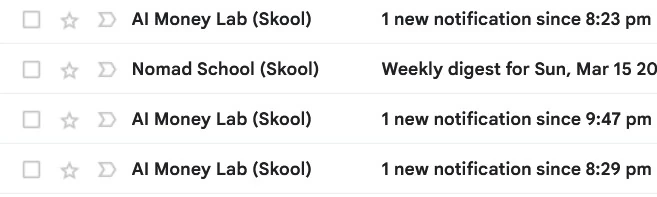
Sure these email will be filters into the “updates” tab in Gmail, but they still help keep people coming back.
Now with video hosting!
Like Thrive Cart, Skool previously did not offer video hosting, so you had to use Bunny.net, YouTube unlisted videos, Vimeo etc.
But that has changed, Skool now allows you to directly upload your videos without using a 3rd party. This feature is available on all plans.
Community first – No sales pages for courses
Skool is a community first platform with a helpful classroom feature. As such, there are no sales pages for your Skool courses inside the classroom if you decide to create a free Skool with paid courses.
This is a problem because you can’t elegantly convert members to buy since they don’t know what exactly is on the inside.
Pros:
- Simple, straightforward pricing that becomes more cost effective as your community grows.
- Offer courses and a community chat function that is well organized.
- Can integrate Thrive Cart is you want a better, more custom checkout process.
Cons:
- Your community will be a subdomain of Skool.com.
- Minimal branding, all Skool communities look the same.
- You’ll need to pay for separate video hosting for your courses.
Learn Dash – The WordPress plugin option
Learn Dash is to courses what WooCommerce is to ecommerce with regards to WordPress. If you want to sell courses directly on your WordPress site, then LearnDash is the plugin you need.
This popular WordPress LMS plugin is used by some big websites, including Yoast, Infusionsoft, the University of Michigan, and WP Elevation.
By utilizing LearnDash, you can create an unlimited number of courses that are both free and paid. The LMS itself has a wide variety of features to allow you to build online courses based on e-Learning principles.
Focus Mode
One helpful feature I like is “Focus Mode,” which blocks out all distractions to help students focus while taking one of your lessons.
LearnDash’s course builder is customizable and easy to work with, especially when it comes to email drip campaigns. If you want to build a great online course that goes along with an email drip schedule, LearnDash is the way to go.
With this method, you can build a complete marketing campaign from beginning to end, attracting leads and selling courses.
Numerous addons for Learn Dash.
One such is their Gradebook addon which is perfect for schools and universities.
With the Gradebook add-on, you can easily keep track of your students’ grades and progress in one neat and orderly location. No more having to check different tools for information on a specific student.
Thrive Cart vs Learn Dash
I know what you’re thinking, so why not use WordPress for sales pages and link to your Thrive Cart checkout page and use Thrive Cart for the deliverable?
Let me break it down:
LearnDash is a plugin for WordPress that costs a monthly fee; it gives you total ownership and “academic” features like advanced quizzes, but you have to handle the technical setup, hosting, and updates yourself.
ThriveCart Learn is a hosted “SaaS” platform that you pay for once rather than every month; it is much easier to set up and is built specifically to help you sell more using “one-click upsells” and “order bumps.”
Use ThriveCart Learn if you are a marketer selling a ‘how-to’ video series. It’s the highest ROI choice.
Use LearnDash if you are an educator building a school. If you need to grade homework, run complex exams, or issue professional certifications, the LearnDash subscription pays for itself by providing a ‘real’ academic experience.
No video hosting
As a plugin, Learn Dash does not provide video hosting. A bit of a deal breaker as they charge $199 a year ($16.50 a month).
Pros:
- As this LMS plugin integrates with WordPress, you have full control over all aspects of the student experience.
- The Gradebook extension makes Learn Dash ideal for courses offered by schools and universities.
- Drag and drop courses builder.
- Create a course (ideally free) using your YouTube videos.
- Offer coupon codes to help drive sales.
- Integrates with WooCommerce so you have control over the checkout process and access to payment processing options.
- Cost effective, only around $120 a year (not month).
Cons:
- Security and updates is your responsibility since it’s a WordPress plugin.
- Costs a subscription fee, so it’s competing against proper LMS’s like Thinkific.
- NO video hosting as it’s a WordPress plugin.
Stellar learning sites?
When you visit LearnDash.com you’ll noticed an offer for Stellar Learning Sites at $29 a month.
Stellar Learning Sites is the hosted version of LearnDash.
Instead of you buying a plugin and finding your own hosting, StellarWP hosts the entire WordPress site for you. It comes pre-installed with LearnDash, a pro theme (Kadence), and performance tools like Object Cache Pro.
But like the plugin version, you don’t get video hosting, you’ll have to source your own host yourself.
Gumroad – The best free option
Gumroad is the “no-excuses” entry point for selling products like digital courses.
It’s a surprisingly good platform for creating and selling all sorts of products, including courses. They are totally free to use but they do charge a 10% transaction fee on all sales.

Gumroad course features
Gumroad makes it very easy for you to sell courses online without any coding or advanced website development skills.
You can either sell products directly from Gumroad with a personalized URL you can share, or embed your courses on your own website with a great looking “buy” button.
In addition you can upload an unlimited number of courses, products, or files for your course. There is even unlimited bandwidth and storage for individual file sizes up (16GB free of charge).
Free email marketing
While I personally suggest using a dedicated email service provider for anyone serious about building out funnels and automatic sales processes, Gumroad is nice in that it does provide a free service to those not wanting or ready to buy a paid plan.
By utilizing their built in email marketing features, you can easily send mass emails that are segmented and tailored to your customer base about new course or product releases, updates to existing courses, general newsletters, and whatever else you need to communicate.
Gumroad Discover
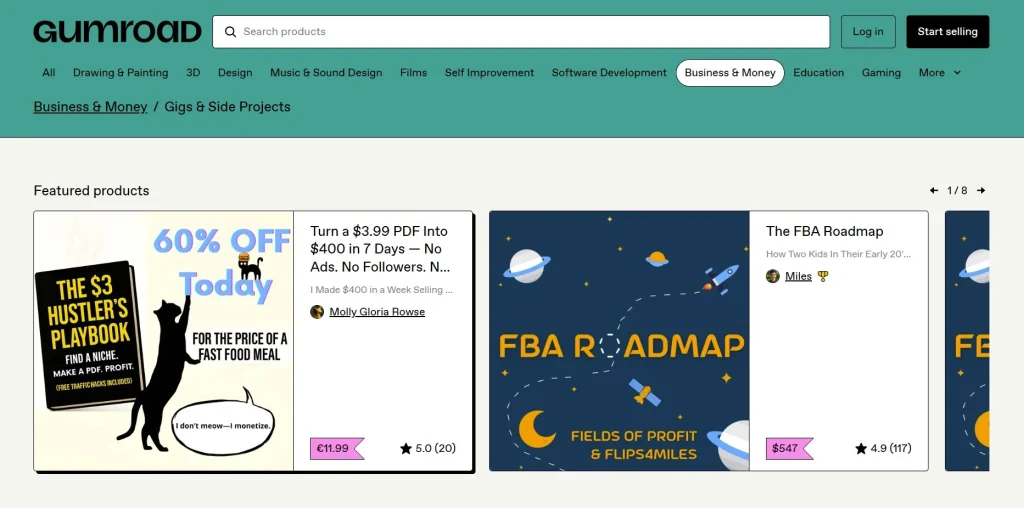
Gumroad provides an internal marketplace to sell your products automatically.
The algorithm looks at what people are buying and suggests similar products, including your video course on their homepage, in search results, and in “recommended” sections after other people’s checkouts.
There is a catch.
Gumroad rewards itself for finding you a customer you didn’t have.
- Direct Sale Fee (10% + $0.50): This is what you pay when you send the customer to your link (from your blog or Twitter).
- Discover Sale Fee (30% Flat): If a customer finds you through the Gumroad marketplace without clicking your link first, Gumroad takes 30% of the sale.
Is it worth it?
Of course! A sale at 70% profit that you wouldn’t have made otherwise is better than 0% profit on a course nobody sees.
Pros and cons
Pros:
- No monthly fee, get started for free with no feature restrictions.
- Gumroad has evolved into a platform to sell pretty much anything online. From courses, ebooks to physical products.
- Manage your own affiliate program.
- Set a custom domain and design your own course website.
- Embed your products and courses on your WordPress website.
- The discover market that drives sales organically.
- Basic email marketing.
Cons:
- 10% transaction fee – but given everything this platform provides it’s more than fair.
- No custom design, it’s all Gumroad branding.
FAQ
What’s the best free online course platform?
Gumroad is the best free online course platform. If you don’t want to spend any money then use Gumroad. Only pay a hefty transaction fee when you make a sale.
Is selling online courses profitable?
Yes, courses can be very profitable. However you need to have some sort of marketing funnel setup and be willing to provide support to your students.
Should I use a subdomain for my courses?
The decision to use a subdomain for your online courses depends on your setup, priorities, and how your main website functions. There’s no universal “yes” or “no,”
What video course host do you recommend?
While you can embed unlisted YouTube videos, Bunny.net provides excellent hosting with content lock features. Perfect for Thrive Cart, Skool and Learn Dash.
Executive summary
So that’s it for my updated guide on the best online course platforms.
TLDR? Alright here is the breakdown:
- Thinkific – Best overall platform. Beautifully designed website and sales pages, easy to use LMS to manage content, community features built in, no product limits like Teachable.
- Thrive Cart – The most cost effective option. Costs a one time fee and you get access to their “Learn” feature.
- Kajabi – All in one marketing system. Email marketing, courses, sales pages, full on website bundled together.
- Skool – Community first with a classroom.
- Learn Dash – The WordPress plugin option. Best if you’re looking to create more of an academic environment.
- Gumroad – Totally free to use with powerful marketing features. But the catch is a 10% transaction fee and minimal design customization.
Overall I like Thinkific and Thrive Cart Learn if you’re looking to sell online courses. Skool is good, too but a better fit if you’re looking to run a community.
How I can help you. You're here, let's do this:
1. Website Review Your website may be clear and specific to you, but it may be really confusing to anyone who visits. That's where I come it, I'll give you actionalbe feedback to improve your site with my highly rated gig.2. My YouTube channel Helpful video tutorials showing you how to launch, grow and monetize your audience.